Stone Design Stone Design
News Download Buy Software About Stone
software
Twittelator Pro Tips and Hints

So many tweets, so little time! See also “
FAQ


Why should I go Pro?
Simply put, the 27 extra compelling features! It’s only $4.99. Raves!

How do I add an account? Change accounts?
In the Groups screen, tap the “People” button in the top left:
To add account, tap “Add Account” in the lower tool bar.
Simply select an account to make that the active account.


How do I scroll to the top of the tweets?
Simply tap the top tool bar!


How do I page down in tweets?
Tap between New Tweet and Emergency button **or**
Hide Emergency button in Settings and get a new down arrow!


How do find out more about/follow people?
Any tweet which references someone eg @bbum can be double-tapped to bring up info on that user. You can see their friends, and their followers. You can start following them. You can read their latest tweets, look at their favorites and visit their personal website. You can bookmark them.

To drill into their friends and friends of friends, simply tap the picture of one of their friends or followers!


How do I update Twittelator to the latest version?
Check these instructions:


Tap picture to get details!
Keep tapping!


Area to left of arrow is “hot”

A selected tweet
(note yellow hilite)

Private = direct message
How can I reply to a tweet?
If there is just one tweet by that author, tap the reply arrow to the right of their name.
If there is more than one, you can either:
        tap the tweet you wish to reply to, and then tap the reply arrow
        tap the tweeter’s picture to bring up the detail and then tap reply arrow or Private button for dm.

You can start a new direct message just by starting a new tweet with “d SCREEN_NAME”

You can start a new thread just by starting a new tweet “@SCREEN_NAME”


What is that small number in the bottom toolbar on the right?
That’s how many more server accesses you can have this hour. If it’s followed by a “m” then that’s how many minutes until your server quota from Twitter.com is reset. Tap the number for more info - see next tip!


How can I find out why I’m getting error messages?
In the Tweet view, tap the rightmost small number in the bottom tool bar to show the Log file

Tap to see Log File
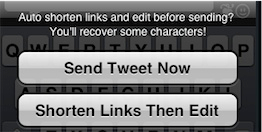
How do I shorten a long URL link while tweeting?
After typing or pasting or twit://’ing from safari a long link in the new tweet window, simply tap “Send” to be given an option to “Shorten Link/Then Edit”


How do I automate sending a URL from Safari?
We prepared this step-by-step guide just for you!


How do I open a web page in Safari?
How do I copy a link in the browser?
How do I email a link from the browser?
How do I open ANY link from the browser?
Tap the rightmost upper Action button in the built-in browser.


560 Dingbats & Emoji - Cool - how do I get to them?
First, while tweeting, tap the “heart and guy smiling” icon to bring up the last selected Dingbat panel. Now, see that "page control" dots above dingbats? tap on right to page forward, tap left to page backwards. You can also use a tap and drag gesture over the dots. You can also simply swipe left or right over the buttons to page back and forward.


How do I respond a user and/or a private message?
Given any tweet, you can tap on the photo and click the Reply arrow for a message and “Private” button for a private message. You can reply to a person mentioned in a tweet by double-tapping the tweet to see that person’s detail. Once your tweet is addressed, you can simply tap the light gray text which says eg “reply to twittelator” to make it a direct message (private), or toggle it from a Private message to a reply by tapping it again.


How can I follow someone I don’t have a tweet for?
Given any tweet, you can tap on the photo and then follow that tweeter. You can also follow any of their friends or followers by tapping on their photo in the detail of the tweeter. Any tweeter mentioned in a tweet you can follow by simply double-tapping the tweet to get the details of that user. If there are more than one tweeter mentioned in the tweet, you have your choice of which to get the details of. Again, in the details’ panel, you’ll see the Start Following button at the bottom.

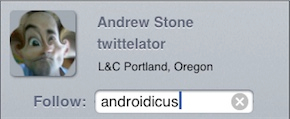
But, let’s say you meet someone in a café or bar and want to start following them. It’s easy: Tap “My Tweets” to find a tweet that you posted. Tap your own Photo to bring up your Detail panel. Your own detail panel has a special text field for entering Ad Hoc twitter screennames to follow. Enter their name and press blue Done button.


How do I see the message someone is replying to?
Simply tap the line of text that says something like:
        about 7 hours ago in reply to 100240343215

This brings up the “Reply Chain” or conversation back and forth back to the first tweet that started the conversation.


Some hint or tip missing from here?
Send @twittelator a tweet!


For more FAQs - check here!


Tap to bring up Dingbats
Drag left or right over dots to page through....

home | raves | news | FAQ | Tips | Tweet from Safari | Features in Pro v Lite 

Get it || Big Stone Phone || iGraffiti Art Space || iPhone Apps


PreviousTopNext
©1997-2008 Stone Design top
Stone Design's Create®
2008-07-09
Valid XHTML 1.0 Transitional